Robust regression
This example illustrates robust polynomial fitting with ℓₚ norm cost functions using the Julia language.
This page comes from a single Julia file: robust-regress.jl.
You can access the source code for such Julia documentation using the 'Edit on GitHub' link in the top right. You can view the corresponding notebook in nbviewer here: robust-regress.ipynb, or open it in binder here: robust-regress.ipynb.
Setup
Add the Julia packages used in this demo. Change false to true in the following code block if you are using any of the following packages for the first time.
if false
    import Pkg
    Pkg.add([
        "ADTypes"
        "ForwardDiff"
        "InteractiveUtils"
        "LaTeXStrings"
        "LinearAlgebra"
        "MIRTjim"
        "Optim"
        "Plots"
        "Random"
    ])
end
Tell Julia to use the following packages. Run Pkg.add() in the preceding code block first, if needed.
using ADTypes: AutoForwardDiff
import ForwardDiff
using InteractiveUtils: versioninfo
using LaTeXStrings
using LinearAlgebra: norm
using MIRTjim: prompt
using Optim: optimize, LBFGS
import Optim
using Plots: default, plot, plot!, scatter, scatter!, savefig
using Random: seed!
default(); default(label="", markerstrokecolor=:auto, widen=true, linewidth=2,
    markersize = 6, tickfontsize=12, labelfontsize = 16, legendfontsize=14)
The following line is helpful when running this jl-file as a script; this way it will prompt user to hit a key after each image is displayed.
isinteractive() && prompt(:prompt);Simulated data from latent nonlinear function
s = (t) -> atan(4*(t-0.5)) # nonlinear function

seed!(0) # seed rng
M = 12 # how many data points
tm = sort(rand(M)) # M random sample locations
y = s.(tm) + 0.1 * randn(M) # noisy samples
y[2] = 0.3 # simulate an outlier
y[M-2] = -0.3 # another outlier

t0 = range(0, 1, 101) # fine sampling for showing curve
xaxis = (L"t", (0,1), 0:0.5:1)
yaxis = (L"y", (-1.2, 1.7), -1:1)
p0 = scatter(tm, y; color=:black, label="y (data with outliers)",
 xaxis, yaxis)
plot!(t0, s.(t0), color=:blue, label="s(t) : latent signal", legend=:topleft)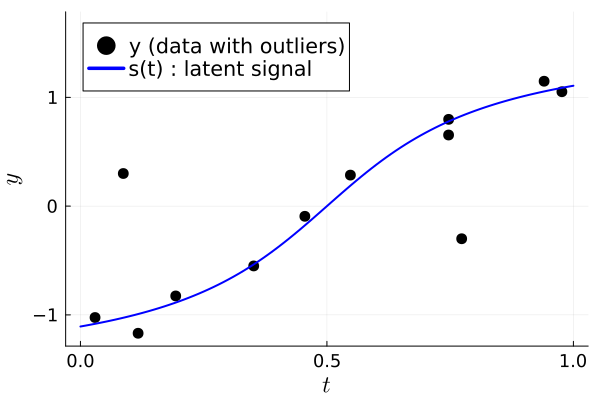
prompt()Polynomial model
deg = 3 # polynomial degree
Afun = (tt) -> [t.^i for t in tt, i in 0:deg] # matrix of monomials
A = Afun(tm) # M × 4 matrix
p1 = plot(title="Columns of matrix A", xlabel=L"t", legend=:left)
for i in 0:deg
    plot!(p1, tm, A[:,i+1], marker=:circle, label = "A[:,$(i+1)]")
end
p1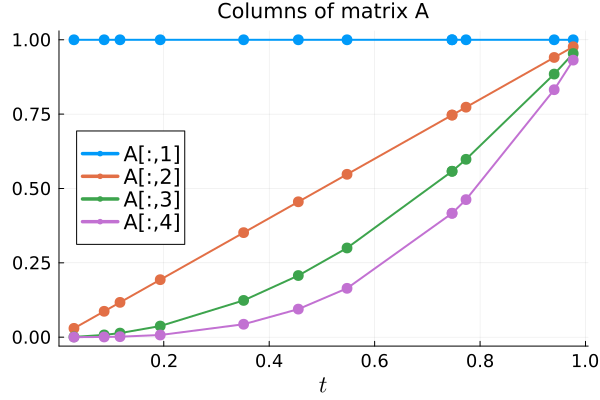
prompt()LS estimation
This is not robust to the outliers.
xls = A \ y # backslash for LS solution using all M samples

p2 = deepcopy(p0)
plot!(p2, t0, Afun(t0)*xls, color=:magenta, label="LS fit")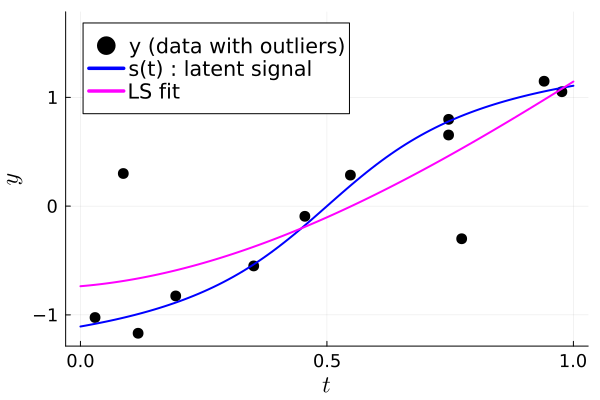
prompt()Robust regression
Using (differentiable) p-norm with $1 < p ≪ 2$ avoids over-fitting the outlier data points.
p = 1.1 # close to ℓ₁
cost = x -> norm(A * x - y, p)
x0 = xls # initial guess
options = Optim.Options(store_trace = true)
outp = optimize(cost, x0, LBFGS(), options; autodiff = AutoForwardDiff())
xlp = outp.minimizer

plot!(p2, t0, Afun(t0)*xlp, color=:green, line=:dash,
 label="Robust fit p=$p")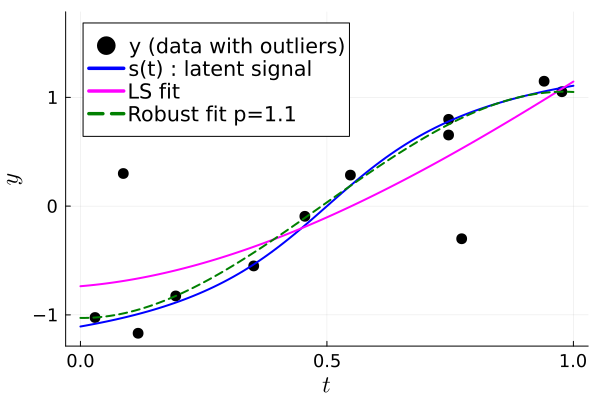
Using 1-norm produces nearly the same results as using the p=1.1 norm.
cost1 = x -> norm(A * x - y, 1) # ℓ₁
out1 = optimize(cost1, x0, LBFGS(), options; autodiff = AutoForwardDiff())
xl1 = out1.minimizer

plot!(p2, t0, Afun(t0)*xl1, color=:orange, line=:dashdot,
 label="Robust fit p=1")

# savefig(p2, "robust-regress.pdf")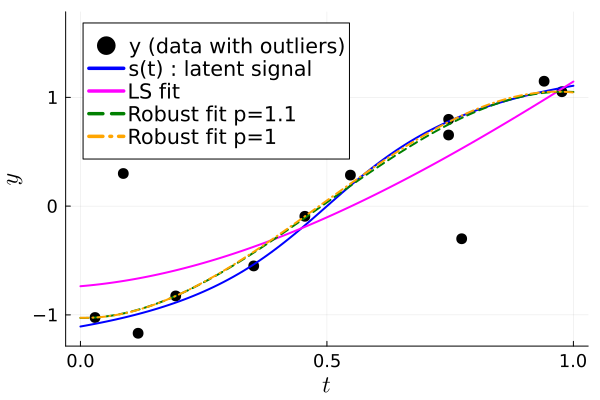
Convergence plots
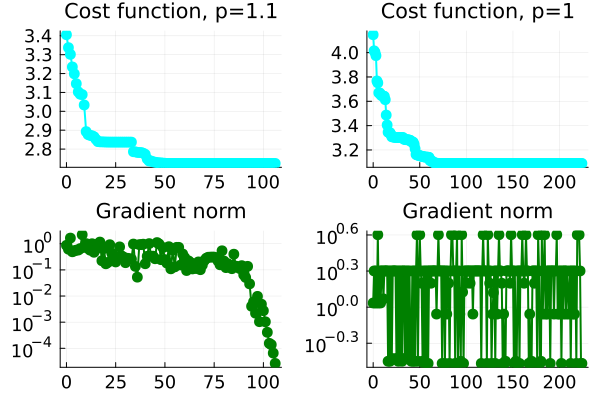
The "gradient" norm does not approach 0 for $p=1$ because the 1-norm cost function is not differentiable.
Nevertheless, L-BFGS seems to minimize the cost function here.
function plot_convergence(out, p)
    otrace = Optim.trace(out)
    iters = map(t -> t.iteration, otrace)
    costs = map(t -> t.value, otrace)
    gnorm = map(t -> t.g_norm, otrace)

    marker = :circle
    return plot(
        plot(iters, costs; title = "Cost function, p=$p",
            marker, color = :cyan),
        plot(iters, gnorm; title = "Gradient norm",
            marker, color = :green, yscale = :log10),
        layout = (2,1),
    )
end

pc = plot(
    plot_convergence(outp, p),
    plot_convergence(out1, 1),
)
This page was generated using Literate.jl.